
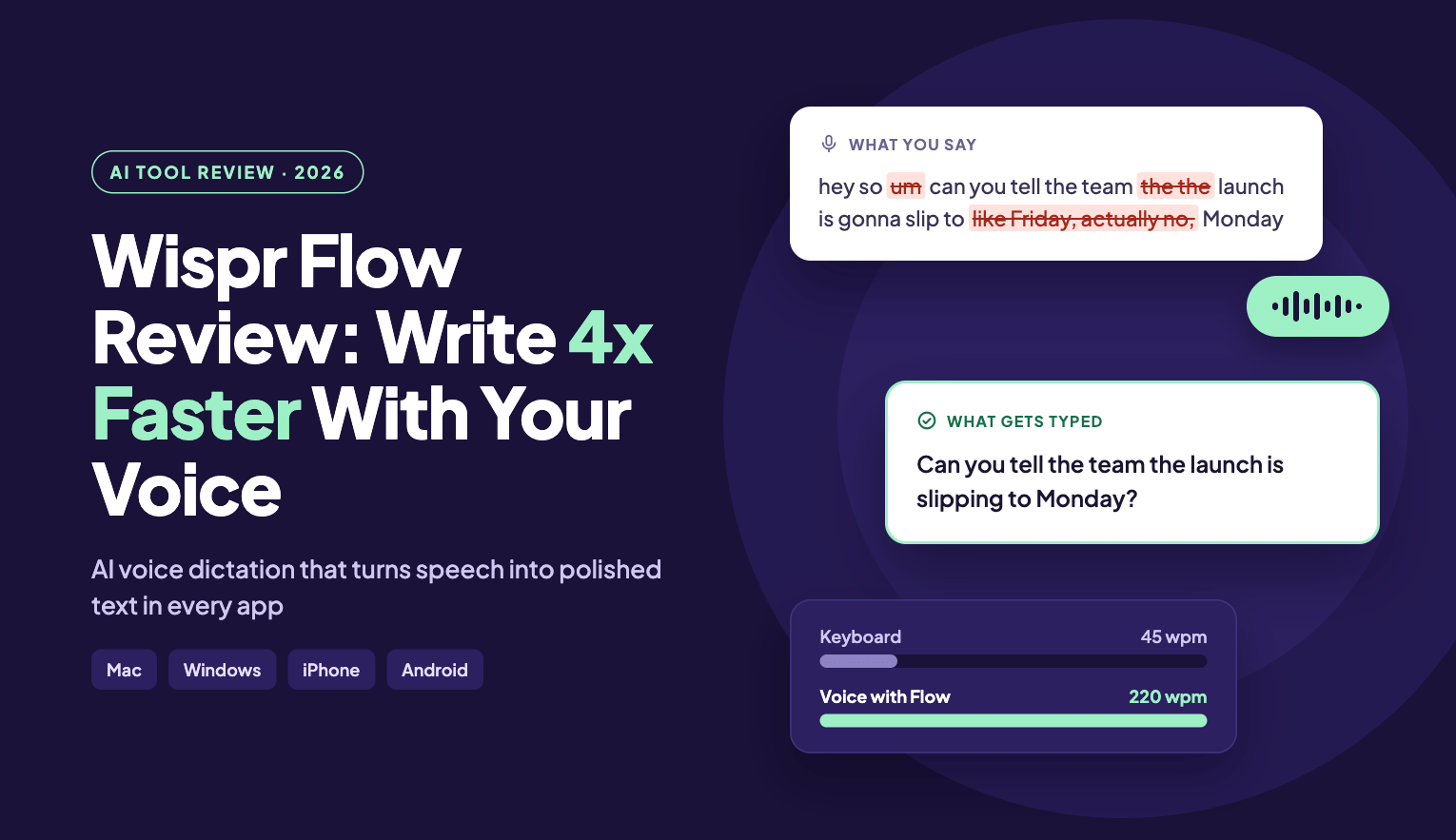
Wispr Flow Review 2026: The AI Voice Dictation Tool That Types 4x Faster
in AI Tools on October 10, 2026If you spend hours every day typing emails, Slack messages, documents or prompts for ChatGPT and Claude, there’s a good chance your keyboard is the slowest part of your workflow. Most people type around 40–45 words per minute. However, we speak closer to 150–220. That gap is exactly what Wispr Flow is built to close.
In this Wispr Flow review, I’ll walk you through what the tool does, its key features, pricing, who it’s best for, and how it compares to built-in dictation like Siri and Google voice typing.
👉 Try Wispr Flow for free here
What Is Wispr Flow?
Wispr Flow is an AI voice-to-text app that turns your natural speech into clean, ready-to-send writing in any app on your computer or phone. Unlike basic dictation tools that write down every word you say (including every “um,” “uh,” and half-finished sentence), Wispr Flow understands what you meant to say and formats it properly.
In other words, you can ramble, pause, or correct yourself mid-sentence, and Flow outputs a polished message that reads like you typed it carefully.
Best of all, it works on Mac, Windows, iPhone and Android, and it’s used by professionals at companies like Microsoft, Amazon, Notion, Vercel and Klarna. In addition, the company recently raised $81 million to build what it calls a “Voice OS,” which shows how seriously the market is taking voice-first productivity.
Why Voice Dictation Is One of the Most Underrated AI Tools
When people talk about the best AI tools, they usually think of chatbots, image generators or AI coding assistants. Yet one of the biggest productivity gains comes from something simpler: removing the keyboard bottleneck.
Here’s why AI dictation matters:
- You think faster than you type. Speaking lets your ideas flow without getting stuck on spelling and punctuation.
- Better AI prompts. When you talk to ChatGPT, Claude or Cursor, you naturally give more context, which leads to better AI responses.
- Less strain. Fewer hours hunched over a keyboard is better for your wrists and posture.
- Accessibility. Voice input is a game-changer for people with mobility challenges or RSI.
Key Features of Wispr Flow
1. Up to 4x Faster Than Typing
Wispr Flow claims you can write around 220 words per minute with your voice versus roughly 45 wpm on a keyboard. As a result, emails, reports and messages get done in a fraction of the time.
2. Smart Auto-Editing as You Speak
This is where Wispr Flow beats ordinary speech-to-text. It automatically:
- Removes filler words like “um,” “uh,” and “like”
- Detects corrections (“let’s meet at 5… actually 6pm” becomes “Let’s meet at 6pm”)
- Removes repeated words
- Adds punctuation and formatting, including lists and paragraphs
3. Works in Every App, No Plugins Needed
Flow types wherever your cursor is. For instance, Gmail, Slack, Notion, iMessage, Google Docs, VS Code, your terminal, and AI tools like ChatGPT, Claude and Cursor all work out of the box. So if you can type there, you can dictate there.
4. 100+ Languages Supported
Wispr Flow supports more than 100 languages and can detect the language you’re speaking. It also handles a wide range of accents well, which makes it a strong pick for non-native English speakers.
5. Personal Dictionary That Learns Your Words
Client names, product names, technical jargon, acronyms: Flow learns them automatically, or you can add them yourself. Moreover, the more you use it, the more accurate it gets.
6. Snippets for Text You Type All the Time
Save frequently used text like your email signature, address, Calendly link or bio as a snippet. Then, just say the shortcut, and Flow expands it instantly.
7. Custom Writing Styles Per App
For example, you can set different tones for different places: formal for email, casual for work chat, very casual for texts with friends. Flow adapts so your writing still sounds like you.
8. Wispr Flow Notetaker for Meetings
Wispr Flow now includes an AI Notetaker for Mac and Windows. It records meetings on Zoom, Google Meet, Microsoft Teams, Slack huddles, and even in-person conversations, then gives you a transcript with named speakers, a topic-based summary and next steps. Above all, no bot joins your call, because it runs on your device. You can even use your meeting notes inside Claude and ChatGPT.
9. Enterprise-Grade Privacy and Security
In fact, your voice data is never sold, and you control whether your data is used to improve the product. Wispr Flow is also SOC 2 Type II, ISO 27001 and HIPAA certified, which makes it suitable for professionals in legal, healthcare and enterprise environments.
👉 Start using Wispr Flow free (no credit card needed)
Wispr Flow vs Built-In Dictation (Siri, Apple Dictation, Google Voice Typing)
| Feature | Wispr Flow | Apple Dictation / Siri | Google Voice Typing |
|---|---|---|---|
| Removes filler words | ✅ Yes | ❌ No | Limited |
| Understands mid-sentence corrections | ✅ Yes | ❌ No | Limited |
| Auto formatting (lists, paragraphs) | ✅ Yes | ❌ No | Limited |
| Works across Mac, Windows, iOS, Android | ✅ Yes | Apple devices only | Mostly Google ecosystem |
| Personal dictionary | ✅ Yes | Limited | Limited |
| Custom tone per app | ✅ Yes | ❌ No | ❌ No |
| AI meeting notetaker | ✅ Yes | ❌ No | ❌ No |
In short, built-in dictation gives you a raw transcript you then have to clean up. However, Wispr Flow gives you something ready to send.
Wispr Flow Pricing (2026)
Wispr Flow offers a generous free plan, so you can test it properly before paying anything.
- Free – $0/month: 2,000 words per week on desktop and 1,000 on mobile, 100+ languages, dictionary and snippets, and limited Notetaker access. No credit card required.
- Pro – $12/user/month (billed annually) or $15 monthly: Unlimited dictation, longer Notetaker history, shared team dictionary and snippets, team billing, priority support and early access to new features.
- Growth – from $18/user/month (billed annually): Everything in Pro plus SSO, HIPAA enforcement with a signed BAA, and admin controls.
- Enterprise – Custom pricing: Advanced security, SCIM provisioning, audit logs, MDM, and dedicated support.
💡 Student tip: Students and educators with an education email get 50% off Flow Pro. Similarly, discounts are available for nonprofits.
Pricing may change, so check the latest plans on the Wispr Flow website.
Who Should Use Wispr Flow?
Wispr Flow is a great fit for:
- Founders and leaders who send dozens of emails and messages every day
- Developers who prompt AI coding tools like Cursor, Claude Code and ChatGPT (“vibe coding” by voice is surprisingly fast)
- Content creators and bloggers who want to draft articles by talking
- Marketers and designers writing briefs, feedback and documentation
- Customer support and sales teams handling high message volume
- Students taking notes and writing assignments
- Lawyers and healthcare professionals who need secure, compliant dictation
- Anyone with RSI or accessibility needs
Pros and Cons of Wispr Flow
Pros
- Turns messy speech into clean, professional text
- Works in every app without integrations
- Available on all major platforms with sync
- Supports 100+ languages and many accents
- Strong privacy and compliance certifications
- Free plan with no credit card required
- Includes an AI meeting notetaker in the same subscription
Cons
- Free plan has a weekly word limit
- Notetaker is desktop-only for now (Mac and Windows)
- Bluetooth earbuds like AirPods can reduce accuracy, so a built-in or wired mic works best
- Speaking out loud isn’t ideal in quiet shared spaces (although Flow can pick up very quiet speech)
How to Get Started With Wispr Flow
- Sign up for Wispr Flow here (it’s free).
- Download the app for Mac, Windows, iPhone or Android.
- Grant microphone access and pick your language.
- Click into any text box, hold the Flow hotkey, and start speaking.
- Finally, add your common names and terms to the dictionary, and set up a few snippets.
As a result, within a day you’ll likely notice you’re reaching for your keyboard a lot less.
Final Verdict: Is Wispr Flow Worth It?
If you write a lot, and almost everyone who works on a computer does, Wispr Flow is one of the most practical AI productivity tools you can add to your workflow in 2026. It doesn’t just transcribe your voice; instead, it turns your thoughts into polished writing in any app, on any device.
In addition, the free plan is generous enough to try it for real, and Pro is affordable for anyone who saves even an hour a week.
🚀 Try Wispr Flow free today and start writing 4x faster
Frequently Asked Questions About Wispr Flow
Is Wispr Flow free?
Yes. There’s a free plan with 2,000 words per week on desktop and 1,000 on mobile, with no credit card required. You can also upgrade to Pro for unlimited dictation.
Does Wispr Flow work with ChatGPT and Claude?
Yes. It works anywhere you can type, including ChatGPT, Claude, Cursor, Gmail, Slack, Notion and code editors.
Is Wispr Flow better than Apple Dictation?
For most people, yes. Apple Dictation writes down everything you say word for word, while Wispr Flow removes filler words, catches corrections, formats your text and works across Mac, Windows, iPhone and Android.
Does Wispr Flow support languages other than English?
Yes. It supports more than 100 languages and handles a wide range of accents.
Is Wispr Flow safe and private?
Yes. The company never sells your data, lets you control data-sharing settings, and holds SOC 2 Type II, ISO 27001 and HIPAA certifications.
Does Wispr Flow work on Windows?
Yes. You can use it on Mac, Windows, iOS and Android, and your settings sync across devices.
What is the Wispr Flow Notetaker?
It’s a built-in AI meeting assistant for Mac and Windows that records meetings without a bot, then creates transcripts with speaker names, summaries and action items.